Windows Service Creation
sc create service_name binpath= "C:\path\to\service.exe"
sc create service_name binpath= "C:\path\to\service.exe"
private static void DoWithRetries(Action action,
                                  int tryCount = 3,
                                  string addMessage = "")
{
    bool success = false;
    int tryIndex = 0;

    do
    {
        try
        {
            action();
            success = true;
        }
        catch (Exception ex)
        {
            tryIndex++;

            // any sort of logging
            Console.WriteLine($"Operation [{addMessage}] failed. Attempt nr. [{tryIndex}]. Exception: [{ex.Message}]");

            if (tryIndex >= tryCount)
                throw;
        }
    } while (!success);
}
Usage example:
DoWithRetries(() =>
{
    if (rng.Next(0, 3) > 0) // 33%
    {
        throw new Exception("random exception");
    }
    Console.WriteLine("Operation finished successfully");
}, 5, "Random Exception Thrower");
Result:
Operation [Random Exception Thrower] failed. Attempt nr. [1]. Exception: [random exception]
Operation [Random Exception Thrower] failed. Attempt nr. [2]. Exception: [random exception]
Operation finished successfully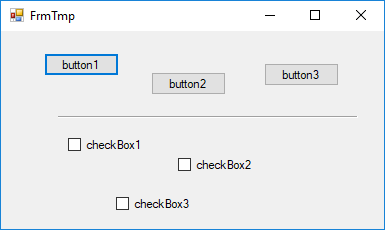
To create a separator you need to add a label element to the form. Then you need to set the following parameters to it:
Or in code:
lblSeparator.AutoSize = false;
lblSeparator.Height = 2;
lblSeparator.Width = 300;
lblSeparator.BorderStyle = BorderStyle.Fixed3D;
$files = Get-ChildItem -Recurse -Path "C:\path\to\root\folder"

foreach($file in $files)
{
    if(!$file.PSIsContainer)
    {
        Write-Host $file.FullName
    }
}

This function runs an SQL query and displays results in a new Excel sheet:
function SQLtoXLS {
    param([String]$sql, [String]$server, [String]$db)

    $tbl = Invoke-Sqlcmd -ServerInstance $server -Database $db -Query $sql

    $xl = New-Object -comobject Excel.Application
    $xl.Visible = $False
    $xl.DisplayAlerts = $False

    $wb = $xl.WorkBooks.Add()
    $ws = $wb.Worksheets.Item(1)
    $ws.Name = "SELECT results"

    $r = 0

    if($tbl.Count -gt 0)
    {
        $rowCount = $tbl.Count
        $colCount = $tbl[0].ItemArray.Count

        $grid = New-Object 'string[,]' ($rowCount + 1), $colCount

        $c = 0
        foreach($col in $tbl[0].Table.Columns)
        {
            $grid[$r, $c] = $col.ColumnName
            $c++
        }
        $r++

        foreach($row in $tbl)
        {
            $c = 0
            foreach($i in $row.ItemArray)
            {
                $grid[$r, $c] = [String]$i
                $c++
            }
            $r++
        }

        $ws.Range($ws.Cells.Item(1,1), $ws.Cells.Item($rowCount + 1, $colCount)).Value = $grid
        $ws.Range($ws.Cells.Item(1,1), $ws.Cells.Item(1, $colCount)).Font.FontStyle = "Bold"
    }
    else
    {
        $ws.Cells.Item(1, 1).Value2 = "No results"
    }

    $ws.Columns.AutoFit() | Out-Null
    $ws.Rows.AutoFit() | Out-Null
    $xl.Visible = $True
}
Usage example:
SQLtoXLS -sql "SELECT * FROM sql_table" -server "localhost" -db "my_db"
$u = Get-ADUser -Identity 'username' -Server 'server.lv' -Properties extensionAttribute1,extensionAttribute2

$u.extensionAttribute1
$u.extensionAttribute2
$sql = "SELECT * FROM SQL_TABLE"
$tbl = Invoke-Sqlcmd -ServerInstance "localhost" -Database "my_db" -Query $sql
Write-Host $tbl.Count
SELECT
	ROW_NUMBER() OVER (PARTITION BY GROUPING_COL ORDER BY ID_COL) AS rn,
	ID_COL,
	GROUPING_COL,
	SOME_VALUE,
	SOME_VALUE2
FROM SQL_TABLE
$xlsFilePath = "C:\Excel_file.xlsx"

$xl = New-Object -comobject Excel.Application
$xl.Visible = $False
$xl.DisplayAlerts = $False
$wb = $xl.WorkBooks.Open($xlsFilePath)
$ws = $wb.Worksheets.Item(1)

$value = $ws.Cells.Item(1, "A").Value2
Write-Host $value
# ...

$wb.Close($false)
$xl.Quit()

[System.GC]::Collect()
[System.GC]::WaitForPendingFinalizers()
[System.Runtime.Interopservices.Marshal]::ReleaseComObject($xl) | Out-Null